
20 March 2026 Leave a comment QA, Test automation
Yesterday, I had the chance to present Repeato in Motorola’s “GenAI for Developers” open forum and show how modern UI test automation can go beyond simple record-and-playback.
Instead of focusing on AI for the sake of AI, I wanted to show something more practical: how a real-world workflow like two-factor authentication (2FA) can be automated across a mobile app and a web browser in a way that is fast to build, maintainable, and accessible even for non-technical testers.
That use case captures a broader shift in test automation: teams do not just need scripts that can click buttons. They need tools that can handle dynamic interfaces, multi-step workflows, and cross-platform scenarios without becoming brittle.
Why 2FA is a good test for test automation tools
Two-factor authentication is a perfect example of where traditional automation often becomes painful.
A test does not stay inside one environment. It starts in the mobile app, triggers an email or message, switches to another channel to retrieve the code, extracts the relevant information, returns to the app, enters the code, and verifies that the login actually succeeded.
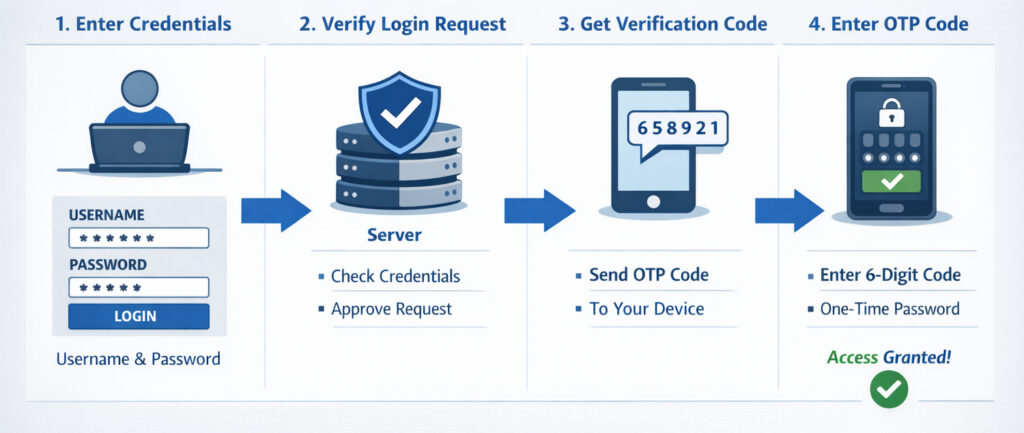
This sounds simple from a user perspective, but from an automation perspective, it introduces several challenges:
- interactions across app and browser
- dynamic content such as one-time PIN codes
- waiting for content to become visible at the right moment
- dealing with UI elements that may not have stable technical identifiers
- validating outcomes in a way that is robust, not flaky
That is exactly the kind of workflow Repeato was built to support.
Recording a test in minutes
In the session, I demonstrated how a test can be recorded directly in Repeato Studio.
The process starts with a mobile app running locally on an emulator. Once recording begins, Repeato captures the user’s interactions step by step: launching the app, tapping fields, entering credentials, and pressing the login button.
What matters here is not just that the clicks are recorded. Repeato also creates multiple locator strategies in the background. If a UI element has no ID or other stable selector, it can fall back to visual fingerprints, text, and alternative matching strategies.
That is important because many real applications are not built with perfect testability in mind. Teams often run into screens where the “ideal” locator simply does not exist. In those cases, computer vision becomes more than a convenience; it becomes a practical way to keep test creation moving.
Switching from mobile app to browser in one test
After logging in, the demo app requested a six-digit verification code.
At that point, the test switched from the mobile app to a browser instance showing a dummy mail client. This is where Repeato stands out compared to many traditional automation setups: the same test flow can move between different devices and browsers without forcing the team to split the scenario into disconnected parts.
For teams testing authentication flows, messaging apps, multiplayer scenarios, or any workflow involving multiple endpoints, this matters a lot. The real user journey often crosses boundaries. Test automation should be able to do the same.
Using AI to extract dynamic content
Once the email arrived, the next challenge was extracting the six-digit PIN from the message.
There are several ways to approach this. A conventional route would be to scan all text on the screen with OCR and then parse it. That can work, but it is often noisy and brittle. In the demo, I showed a more semantic approach: using AI to extract exactly the value we care about.
Instead of asking the automation to read everything, we tell it what to find.
That is a subtle but important difference. It allows tests to work with dynamic content in a way that is closer to human understanding. The goal is not just to detect pixels or characters, but to identify meaning.
In Repeato, the extracted value can be written into a variable and then reused in later steps. In this case, the PIN code was passed into a JavaScript step and sent back to the mobile device automatically.
Reducing flakiness with smarter waits
One of the most useful moments in the presentation was actually a failure.
The first time the test tried to extract the PIN, it did not work. The reason was simple: the email detail view had not fully loaded yet when the scan step ran.
This is where many automation tools become frustrating. A test fails, and the immediate temptation is to add another arbitrary sleep and hope it helps.
Instead, Repeato makes it easy to inspect what happened. Each executed step stores screenshots, so the recorded reference state can be compared with the most recent run. In the demo, this made it obvious that the scan happened too early.
The fix was not to insert a random delay, but to add a proper wait condition based on the visibility of the detail view. Once that visual wait was added, the test became stable.
That approach is crucial for reliable UI automation. Good test maintenance is not about adding more timeouts. It is about making the system wait for the right condition.
More than record-and-playback: multiple ways to validate UI
Another topic I covered in the session was how Repeato validates UI state.
Simple recorders are useful for interactions, but modern test automation also needs flexible assertions. In Repeato, those can be based on several different strategies:
- visual fingerprints for exact or near-exact UI matching
- text-based checks for verifying content in specific regions
- JavaScript-based logic for conditions such as numeric comparisons
- AI-based validation for semantic checks, such as counting items or identifying a logout button
For example, I showed how AI can be used to validate a statement like “there are three emails in the mailbox.” That kind of assertion can be much more intuitive than building a brittle selector chain, especially in interfaces that are visually rich or only partially structured.
At the same time, not every check should go through a large remote model. AI vision is powerful, but it is also slower and more expensive than local processing.
That is why Repeato combines approaches.
Combining local computer vision with GenAI
A key point from the Q&A was that Repeato is not “an AI product” in the simplistic sense. It is first and foremost a test automation tool that uses AI and computer vision where they add real value.
For simpler and highly performance-sensitive cases, Repeato uses a local vision model built by our team. This model can handle tasks such as detecting whether the screen is static, whether an animation is still running, or whether a simple visual condition is satisfied.
Only when semantic understanding is required does Repeato forward the task to more advanced models.
This hybrid approach matters because it gives teams the best of both worlds:
- speed for simple local checks
- semantic understanding for complex UI interpretation
- lower cost and less waste by not sending every frame to a remote model
- better usability because the complexity is abstracted away from the end user
In other words, AI should not make test automation heavier. It should make it more capable while staying practical.
Built for non-technical testers, without limiting technical teams
One theme I emphasized throughout the presentation is that Repeato was designed to be highly usable for non-technical people, while still offering depth for developers and advanced QA engineers.
Tests can be recorded quickly through the UI, but they can also be extended with JavaScript and Node.js logic. That makes it possible to:
- reset backend data via APIs
- run command-line operations
- execute ADB commands
- load and transform test data
- integrate external libraries
- create highly customized validation flows
This combination is important in real teams. Not everyone wants to write code, but many organizations still need the option to add custom logic when the situation demands it.
Reusable building blocks instead of duplicated tests
One question during the forum was about favorite or underused features. One of the features I highlighted was the ability to nest tests inside other tests.
This allows teams to build reusable blocks for recurring flows such as login, 2FA, onboarding, or navigation. If the shared building block changes, the update can propagate across all tests where it is used.
That keeps larger test suites cleaner and easier to maintain. Instead of duplicating the same fragile sequence across dozens of scripts, teams can compose tests from reusable parts.
For growing automation suites, this can make a major difference in long-term maintainability.
Running locally or at scale
I also explained that Repeato consists of two main products:
- Repeato Studio, the desktop application for creating, editing, and running tests
- Repeato CLI, the headless runner for executing tests on servers or in the cloud
This makes it possible for teams to start locally and then scale into CI or larger batch execution when needed.
In the demo, I showed how saved tests can be organized in folders, added into batches, and executed together with report generation. The resulting reports include screenshots, step-by-step comparisons, device information, and historical metrics from recent runs.
That kind of visibility is critical when debugging failures. A failed test is much easier to fix when the report clearly shows what changed on screen and where the behavior diverged.
What stood out in the discussion
The Q&A touched on several topics that reflect what engineering teams care about today:
- which GenAI models are used for semantic checks
- how token usage is managed
- where the product runs
- whether it works with mobile devices, tablets, simulators, emulators, and web applications
- how local vision compares to remote GenAI performance
One especially relevant point is deployment flexibility. Repeato Studio is available for Windows and macOS, while Repeato CLI supports Linux for headless execution. Tests can cover iOS, Android, phones, tablets, simulators, emulators, and web applications, including cases where elements are rendered in ways that traditional selectors struggle to access.
That makes the platform interesting not only for conventional business apps, but also for more difficult interfaces such as canvas-based web apps, custom hardware workflows, or apps with visually rendered content.
The broader lesson
The main takeaway from the Motorola forum was simple:
Modern test automation should not force teams to choose between usability and power.
It should be fast enough for teams that need to create tests quickly, robust enough to handle messy real-world interfaces, and flexible enough to cover workflows that move across apps, browsers, and devices.
AI can help with that, but only when it is integrated in a grounded, practical way.
That is the direction we are taking with Repeato: combining record-and-playback usability, computer vision robustness, semantic AI validation, and technical extensibility in a single workflow.
For teams dealing with dynamic UI, cross-platform user journeys, and limited automation resources, that combination can dramatically lower the barrier to building useful automated tests.
Interested in trying Repeato?
If you are exploring ways to automate mobile or web testing faster, especially for flows that are difficult to cover with traditional selector-based tools, Repeato is worth a closer look.
The live session focused on a 2FA example, but the same principles apply to many other scenarios: multi-device workflows, dynamic content validation, reusable building blocks, and UI automation in environments where classic locators are not enough.
