
18 May 2026 Leave a comment QA, Test automation
Modern applications are becoming increasingly dynamic. Verification codes, magic links, temporary passwords, order IDs, session tokens, chat invitations, and personalized content appear everywhere — often across multiple devices, apps, or browser windows.
Traditional UI automation tools struggle with these workflows. They often rely on brittle selectors, hardcoded regex parsing, fixed layouts, or manual scripting between systems.
This becomes especially painful when testing 2FA login flows, email confirmations, banking apps, messaging systems, multi-device onboarding, or legacy applications without proper accessibility metadata.
This is where AI-powered text extraction can fundamentally improve UI automation.
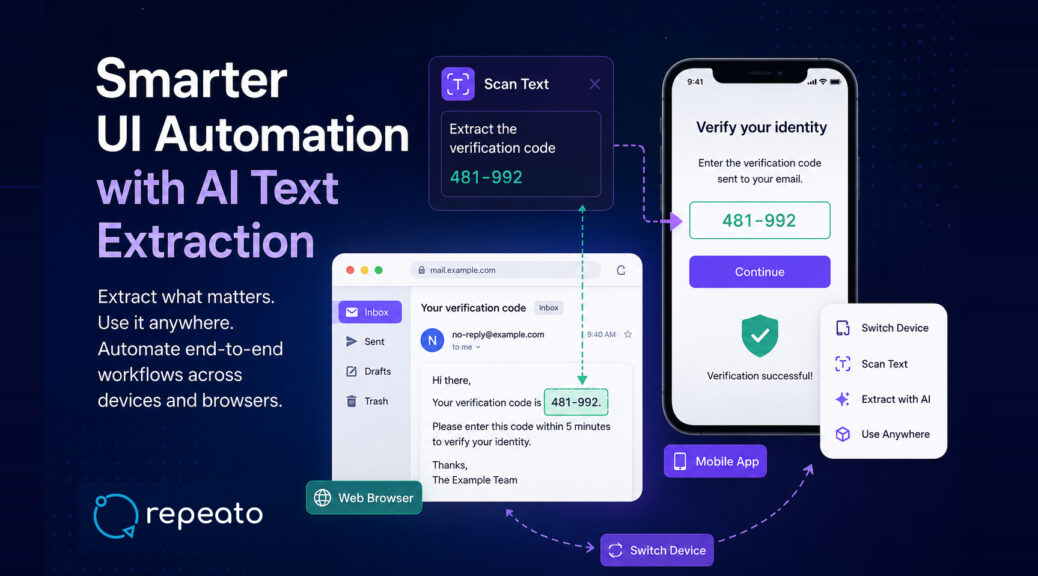
With Repeato’s new Scan Text step, together with Switch Device steps and Web Browser Devices, testers can automate workflows that previously required significant custom scripting.
The Problem with Traditional OCR in UI Automation
Classic OCR can read text from the screen, but real-world automation usually requires more than simply reading everything.
Consider this example:
Your verification code is 481-992. Please enter it within 5 minutes.
Traditional automation often requires OCR extraction, regex parsing, error handling, formatting cleanup, and synchronization between systems.
The real challenge is not text recognition itself. The challenge is understanding which information matters.
Semantic Text Extraction Instead of Raw OCR
Repeato’s Scan Text step combines OCR with AI-powered semantic extraction.
Instead of manually parsing text, you can simply provide prompts like:
- Extract the verification code
- Extract the order number
- Extract the meeting ID
- Extract the customer name
- Extract only the IBAN
- Extract the reset link
The extracted result is automatically stored in a variable and can immediately be reused in later test steps.
This makes automation significantly more resilient against layout changes, wording variations, localization, dynamic UI rendering, and unstructured content.
Example: Fully Automated 2FA Login Flow
A particularly strong use case is two-factor authentication.
Imagine the following scenario:
- A mobile app login triggers a verification email.
- The test switches to a browser session displaying a webmail inbox.
- The verification code is extracted from the email.
- The test switches back to the mobile device.
- The code is entered automatically.
Traditionally, this kind of workflow requires multiple automation frameworks and custom glue code.
With Repeato, it can be implemented visually using Web Browser Devices, Switch Device steps, and Scan Text steps inside a single end-to-end test.
Here is a demonstration of how this can be automated with Repeato in just 3 minutes of work:
Multi-Device Testing Without Complex Infrastructure
Modern applications increasingly involve multiple devices simultaneously.
Examples include device pairing, QR-code onboarding, chat applications, banking approvals, marketplace interactions, multiplayer apps, and customer-support workflows.
Repeato’s Switch Device step allows tests to seamlessly move between mobile devices, tablets, desktop browsers, webmail sessions, and even remote systems.
Combined with AI text extraction, this enables workflows such as extracting a pairing PIN on Device A, switching to Device B, and entering it automatically.
No fragile backend hooks required. No test-only APIs needed. The automation behaves much closer to how real users interact with the product.
Web Browser Devices Enable Real End-to-End Workflows
Many business-critical workflows involve both apps and web interfaces.
For example:
- Mobile app + email inbox
- Desktop SaaS + SMS portal
- Customer portal + admin dashboard
- Marketplace app + browser checkout
- Banking app + TAN confirmation page
Repeato’s Web Browser Devices allow browser sessions to participate like regular devices inside the same automation flow.
This makes it possible to read verification emails, extract reset links, capture temporary passwords, validate confirmation pages, or transfer dynamic data between systems — all inside a single visual test.
Testing Systems Without Selectors or Accessibility Metadata
Another major advantage of AI text extraction is support for difficult environments such as Citrix, SAP, remote desktops, legacy Windows software, canvas-rendered applications, virtualized environments, or systems without stable DOM access.
In these environments, selectors are unreliable or unavailable, accessibility trees are incomplete, and DOM-based automation often fails entirely.
Screen-based semantic extraction provides a much more resilient approach.
Instead of depending on internal application structures, Repeato can simply understand what appears on the screen.
Reducing Flaky Tests
Dynamic UI content is one of the most common causes of flaky automation.
Examples include timestamps, randomized IDs, rotating codes, dynamic greetings, generated usernames, and temporary tokens.
With AI text extraction, tests can extract only the meaningful information, validate it semantically, and ignore irrelevant dynamic content.
This significantly improves test stability.
Beyond Clicking Buttons
UI automation is evolving beyond simple click-and-assert scripting.
Modern workflows increasingly require automation tools to understand screen content, transfer information between systems, interpret dynamic text, and behave more like real users.
By combining semantic AI text extraction, multi-device orchestration, and browser/mobile automation, Repeato enables a new category of resilient end-to-end UI automation.
One that works not only for idealized demo applications — but also for real-world systems.
