
Repeato 1.10
Repeato 1.10 adds faster ways to catch visual defects and set up useful AI checks, while improving matching performance and everyday test editing.
Find broken screens with one AI Vision step
The new Screen Integrity Check examines the visible screen for common layout problems such as clipped headings, overflowing text, overlapping controls, and elements rendered in the wrong shape or position. Add the step at important checkpoints in a test and Repeato reports the defect in plain language when the screen fails.
Because the check uses a large language model, it is best placed once on each important screen instead of after every interaction. This keeps regression suites fast while still covering the layouts that matter.
Read the Screen Integrity Check documentation or watch the feature demo.
Create AI checkpoints with less prompting
The Check Content workflow can now automatically fill AI Vision prompts for UI checkpoints. This makes common visible-content checks quicker to configure and easier to repeat across a test suite. Repeato 1.10 also upgrades the AI Vision model used for these evaluations.
Faster, more dependable element matching
The visual-fingerprint search algorithm is faster and more accurate. Repeato now also requires locator fallbacks when tests run across devices, helping tests find the intended control when device characteristics differ. Messaging for whole-screen fingerprint checks is clearer as well.
Smoother editing and execution
- Save and immediately run a step from the Edit Text dialog with Save and Execute.
- Active browser sessions are extended automatically while you are working.
- Text input on cloud devices is faster through per-keystroke input handling.
- A new Load data from database example helps with data-driven test setups.
Fixes in 1.10
This release also corrects Windows title-bar styling, batch dropdown sizing, app-closing behavior after test-designer changes, missing FileWatcher error reports, function output in log(), and an onboarding tour that could remain open after completion.
View the complete Repeato 1.10 change list on GitHub.
Repeato 1.9
- Workspace Cloud Sync Team workspaces can now be synced via cloud, with explicit consent prompts, sync progress detail window
- Workspace and collaboration UX upgrades Switching and managing workspaces is smoother: recently checked-out workspaces are remembered, dialogs were improved, team members are shown in selection flows, and switching can be blocked while sync is in progress to avoid accidental state issues. Sharing/migration flows were also made safer with clearer prompts and validation.
- Cloud device execution got more robust Cloud-device testing now behaves more predictably in real use: improved back navigation/app switching, better interaction timing stability, fewer premature timeouts during editing, and fixes for one-click run and element-detection issues that previously caused flaky behavior.
- Test authoring improvements, including new step type Added the new Scan Text Step for OCR-based validation scenarios. Recorder behavior after device switching was improved, and custom scripts are easier to find/manage with improved ordering and support for workspace-hosted script examples.
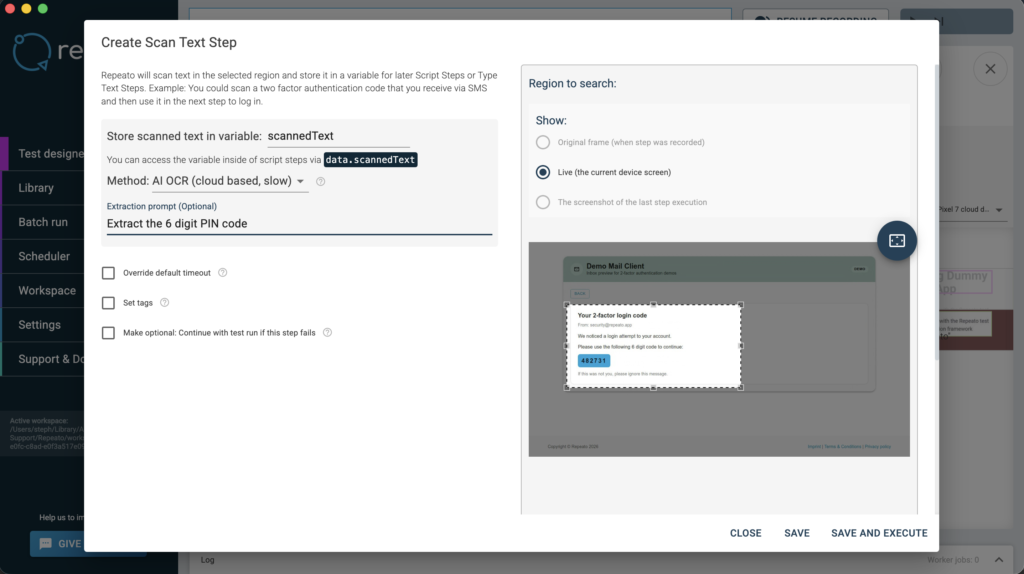
- Batch automation and reporting enhancements Batch scheduling now supports delayed starts (for example +1 min, +10 min, or custom hours), with fixes for schedules that sometimes failed to trigger.
- Scripting/API and automation integrations expanded JavaScript script steps now support Axios out of the box, and report upload capabilities were extended via Repeato JS APIs (including batch runner upload support), making custom integrations and pipeline automation easier. Added examples for automatic report upload and Slack integration.
- Major platform modernization and editor stability Repeato Studio moved from Electron 14 to Electron 40, alongside Monaco editor updates for a smoother day-to-day experience and a richer JS API in Script Steps (Node 24 support).
A more detailed list of changes can be found here.
Repeato 1.8
- New iOS connector based on WebDriverAgent
- Fixed non-clickable buttons on iOS 18
- The legacy iOS connector Swift package is no longer required and should be removed from the app
- Permission dialogs and other system dialogs can now be clicked
- Automations outside of your own app are now possible, so also apps without source code can be tested
- Much faster app restarts
- Improved onboarding tutorial
- More reliable cloud-device test runs
- Cloud devices can now be deleted
- Additional UX improvements and fixes
Repeato 1.7
Web Testing Support! Since the very beginning, many of our users have asked for a single tool that can tackle both mobile and web testing. With Repeato 1.7 that’s now possible.
Key Benefits
- You can now record and run tests on different browser configurations. Just like you are used to it by now.
- Each browser will show up as a virtual “browser device”. So it’s also possible to switch between different browsers (or even between browsers and mobile devices) within a single test run
- Locating UI elements still works using visual fingerprints. Fallback locators for text and CSS selectors are supported as well
Repeato 1.6
Cloud devices bring flexibility and scalability to mobile test automation. With cloud-hosted devices, tests can now be run across multiple devices without setting up emulators or simulators on your system.
Key benefits:
- Teams can now run tests on the same devices without exchanging physical hardware or emulator specifications.
- Windows users (up to this point) could not test iOS apps on their systems. Now they can!
- Local iOS testing required a connector to be installed in your app, which required access to the source code. With cloud devices we got rid of that requirement.
- Emulators and simulators can be quite tricky to configure and use up a whole lot of resources on your system. Not anymore!
Supported device configurations
Here is a list of all the devices we support. All device models can be switched to different OS versions.
iOS: iPhone 8, iPhone 8 Plus, iPhone 11 Pro, iPhone 12, iPhone 13 Pro, iPhone 13 Pro Max, iPhone 14 Pro, iPhone 14 Pro Max, iPhone 15 Pro, iPhone 15 Pro Max, iPad Air (4th generation), iPad Pro 12.9″ (5th generation), and iPad (9th generation).
Android: Nexus 5, Pixel 4, Pixel 4 XL, Pixel 6, Pixel 6 Pro, Pixel 7, Pixel 7 Pro, and Galaxy Tab S7.
Repeato 1.5
Translated UI
Repeato Studio is now available in 21 languages, making it more accessible and user-friendly for non-English speakers.

AI assertions
Now it’s possible to assert elements semantically. You can describe in natural language what Repeato should assert during the test run.

Easy batch-run report sharing
It is now much easier to share batch-run reports with the team:

Step-combo examples
A collection of recipes helps you automate more complex use cases with ease.

Step references
Ever happened to you that you had to change the same step in 5 different tests? We made it much easier, a single click allows you now to change all occurrences of a step in the whole test library.
Screenshot copy tool
A simple button that allows you to easily copy screenshots of your device screen to the clipboard

Repeato 1.4
New PDF report design
Allows you to compare current test run with reference test runs
“Switch device” step
Multi-role testing support. Allows you to automate test cases that involve 2 or more devices (or user roles). Think of testing a chat-app, that allows users to send text back and forth. Or a multiplayer game that allows 2 users to play against each other:
👉 You can find more about the new test step type in the documentation.
Editing history
Access the most recently edited tests quickly via the new edit-history panel.

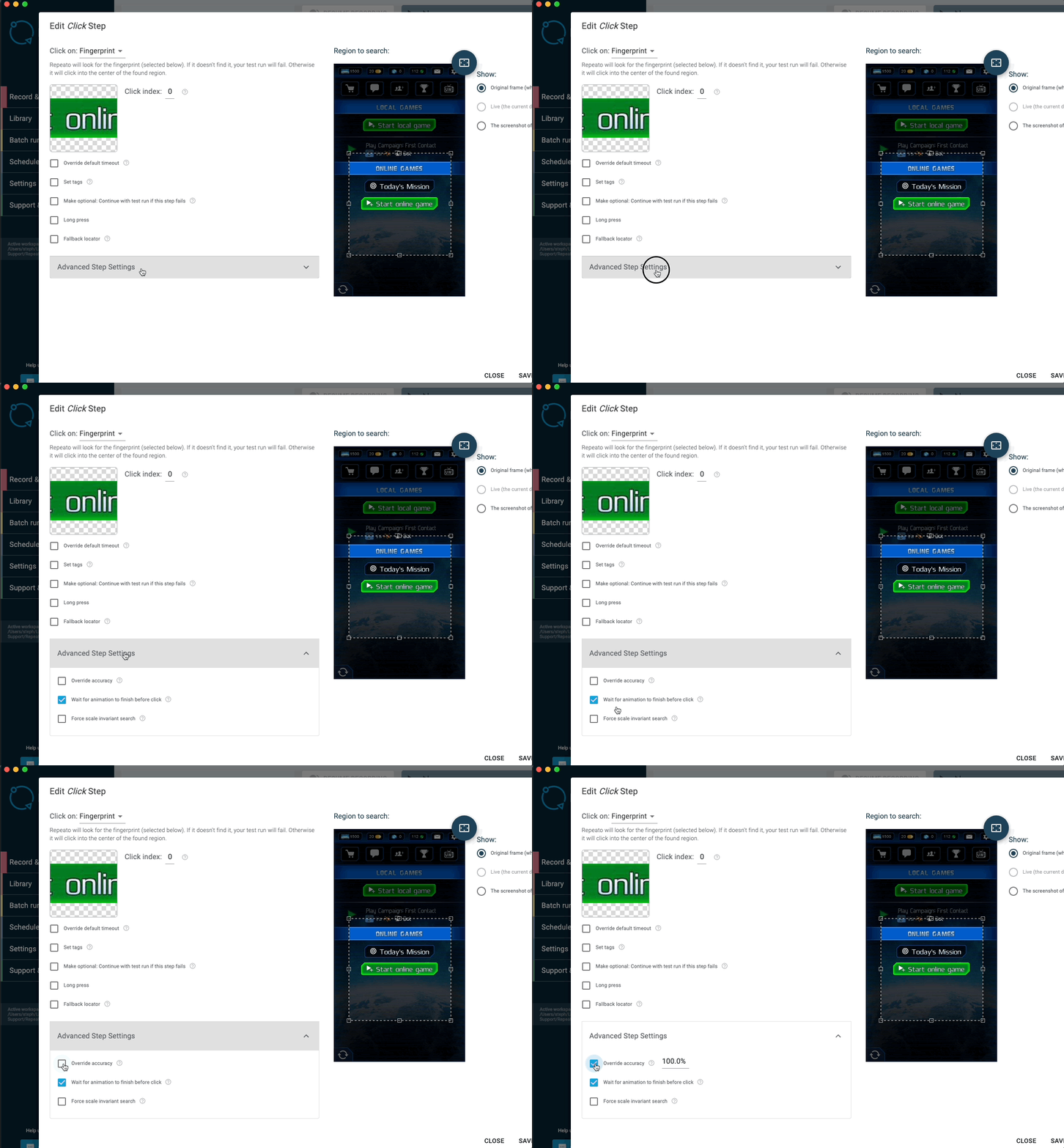
Advanced step settings
Allows you to tweak the search algorithm.
1: Search accuracyAllows you to fine-tune the accuracy of the search algorithm. Decreasing the value will result in a more fuzzy search. Increasing it will make Repeato look more closely.
2: Wait for animation to finish before click: This setting is enabled by default and will improve the stability of your tests. Repeato will wait for elements to stop moving before interacting with them. However, if you ever tried to automate interactions in a game, you might have noticed that Repeato was not able to click moving elements. Well, we got that fixed now.
3: Force scale invariant search By default Repeato will look for the fingerprint in the same size. But what if the element you are looking for changes it’s size? This can happen in a video game, think of a 3D scene, where objects that are further away will be rendered smaller. This setting will allow you to still find and interact with them.
Step comments
Add colorful documentation or links in the middle of your tests:

And many more:
- Library search: Tests can now be filtered by multiple search terms or tags
- Variables are now supported in advanced text search
- Locator fallbacks: When a button can not be found via fingerprint, Repeato can fall back to text-matching
- New JS API: deviceConnector.takeScreenshot
- Strings can now be pasted directly to the device using the paste hotkey
Repeato 1.3
- App log output is now saved to the test run folder
- Screenshot testing capabilities
- Advanced configuration with examples
- Description field for tests
- Tags for steps and tests
- Library: Allow to delete folders with tests inside
- Improved Continuous Integration Documentation Finally, we published some documentation on how you can run tests on BitRise or Github Actions
- Improved UX overall
Repeato 1.2
Test-batch scheduler
Quite a few of our users expressed the need to run batches regularly without the need to setup Repeato CLI. So we added a scheduler that allows you to run specific test batches at specific day times.

Physical iPhone and iPad support
🥜 That was a tough nut to crack 🔨 But we managed: Repeato is going to support physical device automation also for iOS.

Repeato 1.1
- Improved Device Support: A new device connector supports now even more Android devices, including those running Android 13.
Repeato 1.0
- iOS support
- OCR (text recognition)
- Extended JS API
- Search region constraints for UI element lookups
- UX improvements
- Pretty batch run HTML reports
- App quality metrics: Compare test run duration, skipped frames count and app startup time
- Search and filter tests
- Export selected steps to library
- Importing steps from library
- New JS Editor with syntax highlighting, multiline editing, code completion and more
See the Repeato 1.0 release summary
Repeato 0.9.10
- Searchable library (see below)
- Showing test IDs in the library and reports for easier communication within the team (see below)
- A bigger step editing screen for a more detailed selection of fingerprints
- Improved landscape editing
- New testRunner.setNextStepById() allows jumping to steps by referencing their IDs
- Collapsible sub test steps
Repeato 0.8.21
- Simplified test migration to other devices
- Allow cloning tests
- Quick fix broken test runs more easily
- Continous integration test result server
- Bugfixes and UX improvements
Repeato 0.8.20
- JavaScript Support (see below!)
- More command line script examples
- Improved Jira export
- Improved matching algorithm
- Landscape support
- Android 11 support
- UX: Allow switching through step results with keyboard arrows
- UX: Allow user to directly edit steps from within batch runner
Repeato 0.7.0
- Workspaces for teams (git support)
- New test library
- Copy and paste support for steps
- Examples for “Exec Script” steps
- Support for Android 10 emulators
- Bugfixes & design tweaks
Repeato 0.6.4
- Configurable timeout for test steps
- Improved onboarding
- More stability for handling animations
- Improved test migration (multi device support)
- Lots of UX Improvements
- Tons of bugfixes
Repeato 0.6.0
- Implemented Android 10 support
- Added basic help dialog and onboarding tour
- Fixed design issues
- Fixed device connection issues
- Lots of UX Improvements